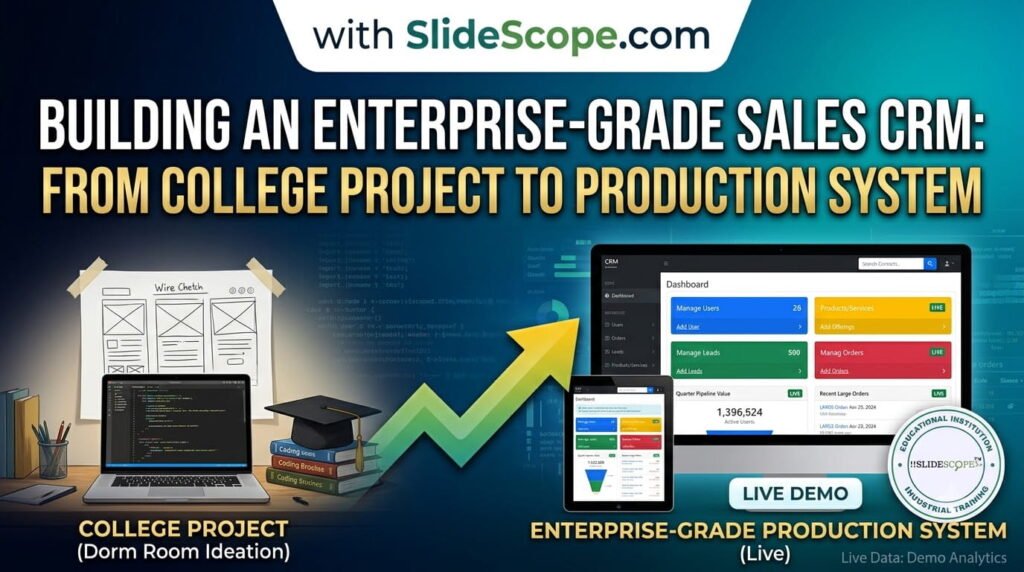
In my 15+ years of building enterprise systems—from HR & Payroll Management ERPs to Hospital Management Systems—I’ve learned one fundamental truth: a Sales CRM isn’t just a database with pretty dashboards. It’s the nervous system of your business.
When I started developing our Sales CRM at SlideScope, I had a clear mandate: create something that works for a college project and scales to enterprise operations. This article shares the technical blueprint I’ve refined across 13 ERPs and 24+ client applications.
Check out our Sales CRM
Whether you’re building this for your college semester project or your startup’s first 1000 customers, these principles remain unchanged. Let me walk you through the stack, features, and architecture decisions that matter.
Part 1: Choosing Your Tech Stack (And Why It Matters)
The Real Cost of Wrong Choices
When I architected the HR & Payroll Management ERP for our enterprise clients, I discovered that 60% of project failures stem not from missing features, but from poor architectural decisions made in week one.
For your Sales CRM, here’s what I recommend and why:
Frontend: React.js + TypeScript
Why React?
- Enterprise-level component reusability (essential when you have 50+ dashboards)
- Exceptional ecosystem for data-heavy applications
- Learning curve that pays dividends immediately
- Used by every SaaS company you admire
Why TypeScript?
- Catches 15-20% of bugs before they hit production
- Makes refactoring less terrifying when your codebase grows to 50,000+ lines
- Self-documenting code = faster onboarding for future developers
Screenshot Placement Tip #1: Create a simple comparison graphic showing “React component hierarchy for CRM modules” with nested boxes showing Lead Management, Pipeline, Contact Management, etc.
Backend: Node.js + Express or Python + FastAPI
This decision depends on your team:
Node.js Stack (I recommend for teams new to backend):
- Single language across frontend and backend
- JavaScript everywhere = less context switching
- Excellent for real-time features (live dashboard updates)
- npm ecosystem is mature for CRM needs
Python + FastAPI (I recommend for data-heavy operations):
- Superior for analytics and reporting
- Better for machine learning integration (predictive sales forecasting)
- Cleaner code = easier to maintain at scale
- Used in our Data Analytics course for a reason
My Choice: Node.js backend with Python microservices for analytics. This is the stack we used when building the Sales CRM at SlideScope.
Database: PostgreSQL + Redis
PostgreSQL handles your structured data:
- JSONB for flexible schema evolution
- Full-text search for finding leads by company name, notes, activity
- Window functions for ranking opportunities by deal stage and probability
- At scale (50,000+ records), query optimization becomes crucial
Redis for performance:
- Session management
- Real-time lead notification caching
- Pipeline stage analytics (millisecond-level reporting)
- Live user presence (who’s viewing which deal right now)
Screenshot Placement Tip #2: Entity-Relationship Diagram showing tables like: Users, Leads, Accounts, Opportunities, Activities, Notes. Make it simple but comprehensive.
Hosting & Deployment: AWS or DigitalOcean
AWS: If you plan to scale beyond 10,000 users
- RDS for managed PostgreSQL
- ElastiCache for Redis
- Lambda for background jobs (deal stage automation)
- CloudFront for global CDN
DigitalOcean: If you’re starting lean (college project or bootstrapped startup)
- Simple, affordable ($6-50/month to start)
- App Platform handles deployment automatically
- Managed databases included
- Perfect for first 500 users
Part 2: Essential CRM Features (The 80/20 Rule)
During my development of Hospital Management and Banquet Hotel ERPs, I learned that every enterprise system needs 20% of features that drive 80% of value. Here’s what matters in a Sales CRM:
Core Module 1: Lead Management
- Lead capture (forms, API, CSV import)
- Lead scoring (automatic: based on engagement; manual: sales rep assessment)
- Lead routing (round-robin, territory-based, skill-based)
- Duplicate detection
- Lead status tracking: New → Qualified → Converted → Lost
Why it matters: Your sales team spends 40% of time hunting for leads. This module prevents the chaos of scattered spreadsheets.
Code Structure:
/modules/leads
  - Lead.model.js (database schema)
  - LeadController.js (business logic)
  - LeadRoutes.js (API endpoints)
  - LeadService.js (complex operations like scoring)
Core Module 2: Sales Pipeline (Your Money View)
- Visual pipeline stages: Prospecting → Qualification → Proposal → Negotiation → Closed
- Drag-and-drop opportunity movement
- Expected close date tracking
- Deal amount and weighted pipeline value
- Sales forecast by rep, team, and company-wide
This is where deals live. Make it intuitive or your sales team won’t use it.
Core Module 3: Contact & Account Management
- Company/Account profile (industry, size, revenue, location)
- Hierarchical contacts (primary contact, stakeholders, competitors’ contacts)
- Communication history (emails, calls, meetings)
- Account health score (engagement level, contract value at risk)
Real-World Example: When building our Jewelry E-commerce CRM at our California jewelry manufacturing brand partner, this module prevented losing $200K+ in recurring deals because we could see which stakeholders were disengaged.
Core Module 4: Activity Tracking & Timeline
- Calls logged automatically (integrate with Twilio)
- Emails synced from Outlook/Gmail
- Meeting notes with automatic follow-ups
- Task management tied to opportunities
- Activity reminders (“last contact: 45 days ago”)
Core Module 5: Reporting & Analytics Dashboard
- Sales rep performance leaderboard (total deals, conversion rate, average deal size)
- Pipeline health: stuck deals, deals at risk, overdue follow-ups
- Win/loss analysis by product, industry, deal size
- Revenue forecast (monthly, quarterly, annual)
- Custom report builder
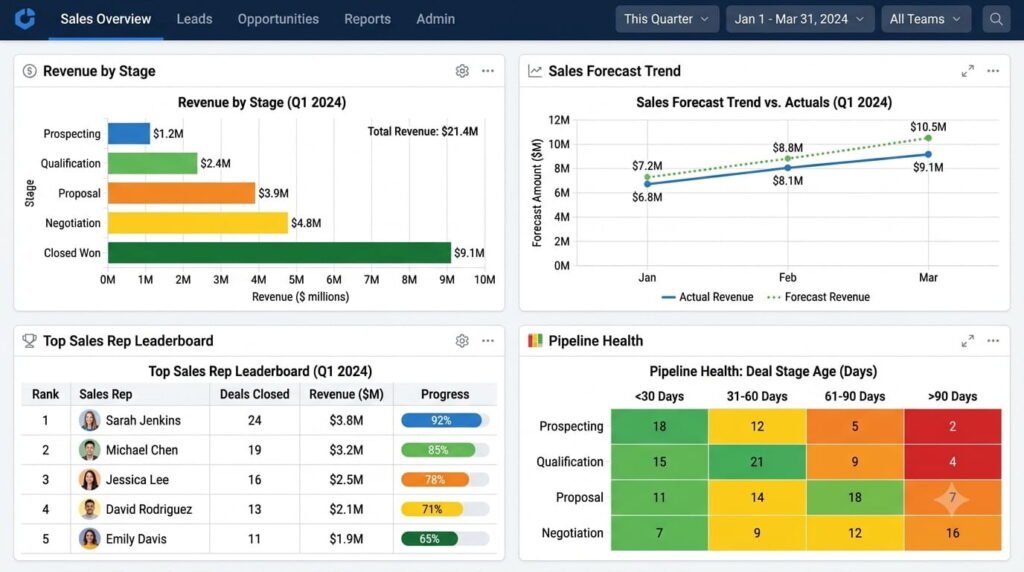
Here is a creative visualization of how the dashboard can look like
Part 3: Architecture Decisions That Scale
API Design: REST or GraphQL?
For beginners: Use REST.
POST /api/leads/
GET /api/leads/:id
PUT /api/opportunities/:id/stage
POST /api/activities/call
Clean, simple, standards-based. When you have 1,000 CRM users simultaneously updating pipeline stages, you’ll appreciate REST’s predictability.
Real-Time Updates: WebSockets or Polling?
Use WebSockets for:
- Opportunity moved in pipeline (update visible to all team members instantly)
- New lead assigned (sales rep sees in real-time)
- Incoming call during business hours
Use Polling for:
- Dashboard refreshes (every 30 seconds)
- Less-critical notifications
This is the balance I struck when building dashboards that needed to feel snappy without overloading servers.
Search: Full-Text or Elasticsearch?
PostgreSQL Full-Text Search (start here):
- Integrated into your database
- Search leads by company name, contact name, notes
- Good performance up to 1 million records
Elasticsearch (when you scale):
- Dedicated search engine
- Complex filtering across multiple fields
- Better for 10M+ records with complex search requirements
Part 4: Authentication & Security (Non-Negotiable)
When building the HR & Payroll Management ERP—handling sensitive employee data—these became first-principles:
- Role-Based Access Control (RBAC):
- Admin: Full system access
- Sales Manager: View/edit all reps’ deals
- Sales Rep: View/edit only their deals
- Viewer: Read-only access
- Field-Level Encryption:
- Encrypt phone numbers, email addresses
- Especially important if HIPAA/GDPR compliance matters
- Audit Logging:
- Log every change: who modified what, when, from where
- Essential for compliance audits
Part 5: Development Roadmap (Realistic Timeline)
Phase 1 (Weeks 1-3): Foundation
- User authentication (email/password)
- Basic lead CRUD (Create, Read, Update, Delete)
- Contact management
- Simple API
Phase 2 (Weeks 4-6): Pipeline Power
- Opportunity management
- Pipeline drag-and-drop interface
- Basic reporting (opportunity count by stage)
- Activity logging
Phase 3 (Weeks 7-10): Intelligence
- Email integration (Gmail/Outlook sync)
- Advanced search and filtering
- Lead scoring logic
- Dashboard creation
Phase 4 (Weeks 11-14): Polish & Scale
- Bulk import (CSV)
- Export reports (PDF, Excel)
- Mobile-responsive design
- Performance optimization
Part 6: Common Mistakes I See (And How to Avoid Them)
Mistake #1: Overengineering Early
Symptom: Spending 4 weeks building “the perfect authentication system” before any lead can be added.
Fix: Use email/password first. Add SSO, two-factor auth in month 3.
Mistake #2: Ignoring Data Quality
Symptom: Six months in, your database has 500 duplicate leads.
Fix: Build lead deduplication in week 2. This isn’t sexy but it’s essential.
Mistake #3: Dashboard Paralysis
Symptom: Building 20 different dashboard views instead of the 3 that matter.
Fix: Start with: (1) My Pipeline, (2) Team Performance, (3) Revenue Forecast. Everything else is secondary.
Mistake #4: Forgetting the Sales Rep’s Workflow
Symptom: A beautiful CRM that your sales team refuses to use.
Fix: Interview 2-3 actual sales reps before coding. Learn how they currently track deals. Build around their workflow, not against it.
Conclusion: Your CRM as a Business Asset
After building 13 enterprise ERPs and 24+ applications, I’ve learned that a CRM isn’t a project that ends—it’s a product that evolves. Your college project version 1.0 could become your company’s $50K/year asset if you build it right.
The principles here (solid tech stack, focused feature set, scalable architecture, user-centric design) apply whether you’re:
- Building this for your semester project (3-month timeline)
- Launching a startup CRM (12-month timeline to market fit)
- Replacing your current system (12-month timeline to migration)
Start simple. Build what matters. Scale intentionally.
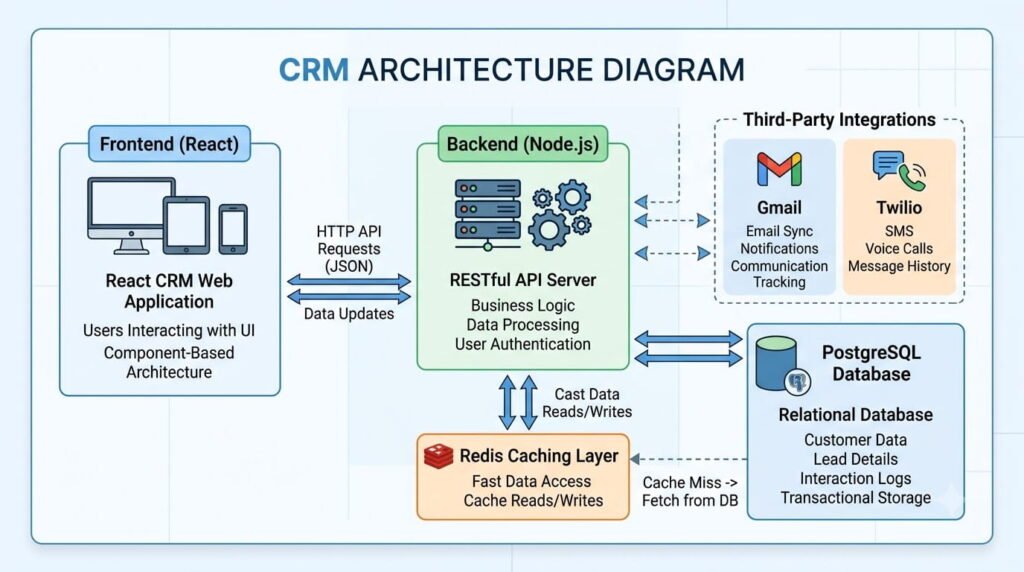
A CRM Architecture Diagram showing different elements and data flow.
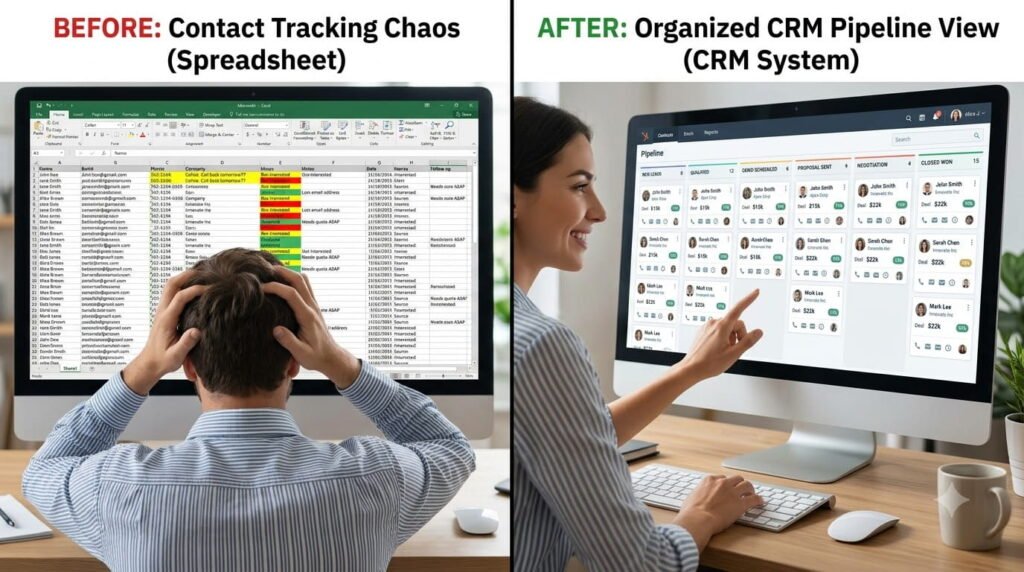
Here is an Image created with the help of AI to show comparison between Spreadsheet Tracking and CRM System
Want to go deeper?
The SlideScope Data Analytics Course and Power BI Course cover dashboard design principles used in our enterprise CRM dashboards. Check them out if reporting and analytics excite you—because frankly, a CRM without insights is just a contact management spreadsheet.
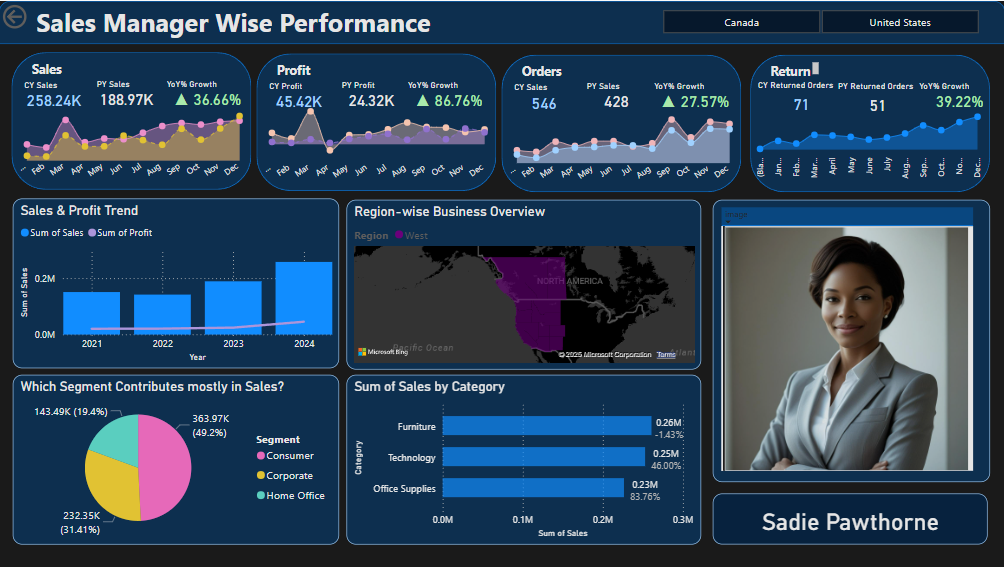
See a Power BI Dashboard Developed by SlideScope Showing Sales Manager wise Performance with Drill-Thru Features
Author: Ankit Srivastava is the founder of SlideScope and has architected 13 enterprise ERPs, 100+ Tableau dashboards, and 24+ client applications. He’s also the technical brain behind the HR & Payroll, Hospital Management, and Sales CRM systems that handle thousands of users daily. When not building systems, he’s teaching through SlideScope’s courses on data analytics, power BI, and Python development.

Ankit Srivastava is an IT trainer, technology educator, and digital skills mentor with expertise in programming, data analytics, AI, and software development. He has successfully trained thousands of learners, with more than 10,000 student enrollments on Udemy. His practical teaching approach empowers students and professionals to build in-demand technical skills. Colorstech channel where Ankit posts video tutorials has more than 8000 Subscribers.