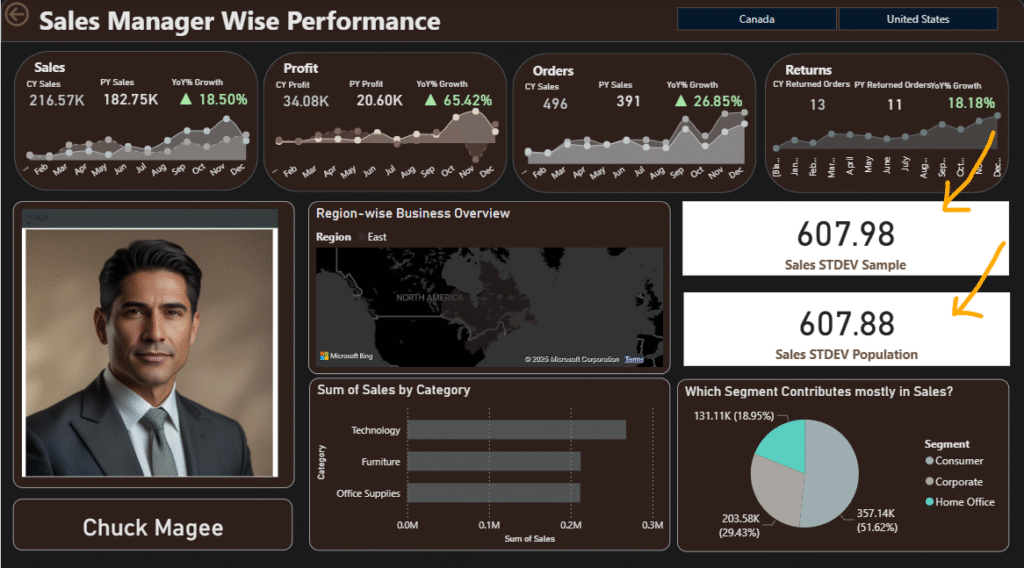
stdev.p and stdev.s dax example

Difference between STDEV.S and STDEV.P in DAX with Example

๐ŸŽฏ Objective Show the difference between STDEV.S() and STDEV.P() DAX functions using real-world data from the Sample Superstore dataset (e.g., Orders table). ๐Ÿ“Œ Quick Definitions Function Meaning Divisor Used When to Use STDEV.S() Sample Standard Deviation Divides by n – 1 Use when data is a sample of the population STDEV.P() Population Standard Deviation Divides …

Difference between STDEV.S and STDEV.P in DAX with Example Read More »

Why Every Technical Student Must Master Git & Version Control

A Directorโ€™s Perspective After 10+ Years in the Trenches By Ankit, Technical Director, Slidescope The Reality Check Letโ€™s start with a hard truth. In my 10+ years of building software โ€” from solo coding nights to leading teams at Slidescope building real-time collaborative systems โ€” one skill consistently separates the prepared from the panicked: Version …

Why Every Technical Student Must Master Git & Version Control Read More »

FIRSTDATE() in Power BI DAX โ€“ Description & Example

๐Ÿ” What it does: FIRSTDATE() returns the first (earliest) date in the current filter context from a column of dates. ๐Ÿงฎ Syntax: โœ… Example: This returns the earliest date where data exists based on the current filters (e.g., per region, product, month, etc.). ๐Ÿง  Used with CALCULATE: Example: Get sales on the first date of …

FIRSTDATE() in Power BI DAX โ€“ Description & Example Read More »

PARALLELPERIOD() in Power BI DAX

Here’s a short description and example of PARALLELPERIOD() in Power BI DAX: ๐Ÿ” What it does: PARALLELPERIOD() shifts the dates in the current context by a specified number of intervals (month, quarter, or year) โ€” but keeps the same length of period. ๐Ÿงฎ Syntax: ๐Ÿงฎ Example: Previous Year Sales ๐Ÿ“Š How it works: Year Month …

PARALLELPERIOD() in Power BI DAX Read More »

๐Ÿ› ๏ธ 5 More Useful Features in Power Query Editor with Explanation

Using this dataset, you can practice these advanced or frequently used features: 1. ๐Ÿ” Filter Rows Based on Conditions Use Case: View only employees who worked in “New York” ๐Ÿ”ง Steps: โœ… Result: Only rows where Location is โ€œNew Yorkโ€ are kept. Real-Life Benefit: Helpful when creating location-specific dashboards. 2. ๐ŸชžTime Column Cleaning โœ… Objective: …

๐Ÿ› ๏ธ 5 More Useful Features in Power Query Editor with Explanation Read More »

Most important 50 DAX functions

Here’s a curated list of the 50 most important DAX functions โ€” grouped by category โ€” that every Power BI Developer should know for interviews, certifications, and real-world use. ๐Ÿ“… Date & Time Functions โณ Time Intelligence Functions ๐Ÿ”ข Math & Aggregation Functions ๐Ÿง  Logical & Conditional Functions ๐Ÿ“Š Filter Functions ๐Ÿ”— Relationship & Table …

Most important 50 DAX functions Read More »

Power Query Editor 3 different features of it on Employee Data

โœ… Sample Dataset: Employee Work Hours (Synthetic) EmployeeID Name Department Date CheckInTime CheckOutTime Location E001 Alice HR 2024-06-01 09:15 17:45 New York E002 Bob Finance 2024-06-01 09:30 18:00 Chicago E003 Charlie IT 2024-06-01 10:00 19:00 San Francisco E004 Diana HR 2024-06-01 09:00 17:00 New York E005 Edward IT 2024-06-01 11:00 20:00 Chicago Hereโ€™s a mini …

Power Query Editor 3 different features of it on Employee Data Read More »

ProductX DAX Function in Power BI

In DAX (Data Analysis Expressions), the PRODUCTX function multiplies all the values of a given expression evaluated over a table. Syntax of PRODUCTX: PRODUCTX(table, expression) table: The table to iterate over. expression: The expression to evaluate and multiply across each row. ๐ŸŽฏ Use Case: Calculating Compound Growth (Multiplicative Change) Letโ€™s say we have a table …

ProductX DAX Function in Power BI Read More »