A few years ago, if you wanted your mobile app to do anything resembling “intelligence” — recognize an image, predict what a user might want next, understand a sentence’s sentiment — you had one real option: send the data to a server, wait for a response, and hope the user’s connection held up long enough not to notice the lag. I’ve built enough apps to remember exactly how much of the user experience got quietly sacrificed to that round trip.
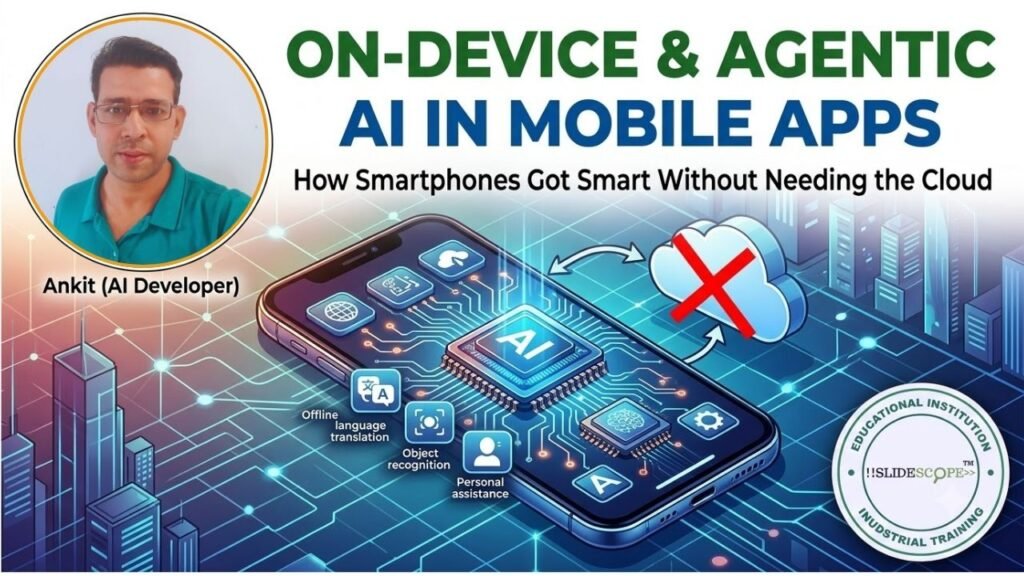
That constraint has fundamentally loosened. Modern mobile apps are moving away from purely rule-based systems and heavy cloud dependency toward something far more responsive: on-device machine learning that runs directly on a user’s phone, combined with generative AI agents that are increasingly involved in how the app itself gets built in the first place. Having shipped a fairly wide range of Android apps over the years — everything from a hospital management system to a school ERP to a transport management tool — I’ve watched this shift happen from the inside, not just read about it.
I’m Ankit Srivastava, and I want to walk through what’s actually changing here, why it matters for anyone building or planning a mobile product right now, and where I’ve personally seen these shifts show up in real, shipped applications rather than just demo videos.
Why the Cloud-Only Model Was Always a Compromise
To understand why on-device AI matters, it helps to be honest about what the old cloud-dependent approach actually cost you. Every time an app needed to classify an image, transcribe speech, or predict user behavior, it had to ship data off the device, wait for processing, and receive a response — introducing latency, consuming data, draining battery on the radio connection, and creating a genuine privacy exposure every time sensitive user data left the device unnecessarily.
For apps handling anything moderately sensitive — and I’ve built several, including a hospital management system that deals with patient records — that cloud round trip isn’t just a performance annoyance. It’s a real architectural liability. Every network call carrying personal data is another point where something can go wrong, get intercepted, or simply violate a user’s reasonable expectation of privacy for information that arguably never needed to leave their device in the first place.
What On-Device Machine Learning Actually Enables Now
On-device ML means the model doing the inference — the actual “thinking” — runs locally on the user’s phone, using frameworks like Apple’s Core ML on iOS and Google’s steadily improving on-device ML tooling (ML Kit, and increasingly Gemini Nano running directly on capable Android hardware) rather than a remote server.
Real-Time Classification Without the Lag
Text and image classification that used to require a server round trip can now happen in milliseconds, directly on the device. This matters enormously for anything involving a camera or live user input — a scanning feature, a content moderation check, a real-time translation overlay — where even a half-second delay breaks the feeling of the app responding naturally to what the user is actually doing.
Hyper-Personalization That Doesn’t Leak Data
One of the more genuinely useful shifts I’ve seen is how on-device models can build a personalization profile — learning a user’s habits, preferences, and usage patterns — entirely locally, without that behavioral data ever needing to be transmitted to a central server for processing. The app gets smarter about the individual user specifically, while that user’s raw behavioral data stays exactly where it started: on their own device.
Predictive UX That Feels Instant
Predictive text, smart suggestions, anticipating the next action a user is likely to take inside an app — these features depend entirely on low latency to feel genuinely useful rather than gimmicky. A prediction that takes a full second to appear after a cloud round trip has usually already missed the moment it was supposed to help with. On-device inference is what makes this class of feature actually pleasant to use rather than a novelty most users quietly disable.
Where I’ve Actually Applied This Thinking in Real Apps
I want to ground this in real projects rather than keep it abstract, because I think the theory only becomes genuinely useful once you see where it actually shows up in a shipped product.
Our Transportation Management App deals with route tracking, scheduling, and logistics data — exactly the kind of use case where fast, local processing of location and scheduling information matters more than waiting on a server for every small update, particularly for users in areas with inconsistent connectivity.
Our Hospital Management System highlights the privacy angle directly — patient management, appointment scheduling, and medical history handling are exactly the categories of data where minimizing unnecessary cloud transmission isn’t just good architecture, it’s a genuine responsibility toward the people whose information the app is handling.
Our School Management System app deals with student records and institutional data at scale, where responsive, reliable local performance directly affects whether school administrators and teachers actually trust and adopt the tool for daily use, rather than reverting to spreadsheets out of frustration with a sluggish interface.
Our AutoCarPortal car-buying guide app is a good example of where predictive, personalized recommendations genuinely improve the user experience — helping users narrow down vehicle options based on their behavior and preferences within the app, rather than presenting a static, one-size-fits-all listing.
Beyond these, we’ve built and shipped several more apps under the same portfolio — a pharmacy and medical store billing system, a metro fare and route finder for Lucknow commuters, and a Hindi-language digital marketing education app, among others — and across nearly all of them, the same underlying lesson holds: the apps that feel genuinely responsive and trustworthy to users are consistently the ones where we’ve thought carefully about what actually needs a server round trip versus what can and should happen locally, right on the device.
The Other Half of This Shift: Agentic AI in How Apps Get Built
The on-device intelligence trend is only half the story. The other major shift — one I’ve felt directly as a developer, not just observed as a trend — is how generative AI agents are changing the actual process of building these apps in the first place.
I’ve written before about vibe coding, and mobile development is exactly where I’ve seen this discipline pay off most concretely. AI coding assistants are now genuinely useful collaborators for logic generation — scaffolding out a data model for a new feature, generating boilerplate for a screen, or suggesting an approach to a tricky state-management problem — as well as for automated testing, where an AI agent can generate a meaningful spread of test cases far faster than a developer writing them by hand from scratch.
This matters specifically for mobile development because of how fragmented the ecosystem is — different frameworks, different platform conventions, different device capabilities to account for. AI coding assistants that understand this context well can meaningfully shrink the time between “we need this feature” and “this feature is built and tested,” which is exactly the kind of speed advantage that let a small team like ours ship as many distinct apps as we have, each handling genuinely different domains — healthcare, education, logistics, retail — without needing to rebuild deep domain expertise completely from scratch for every single project.
The caution I’d add here, consistent with everything I’ve written about vibe coding before: AI-assisted development changes your speed, not your standards. Every one of the apps in our portfolio still goes through real testing and review before shipping, particularly anything touching sensitive data like the hospital or school management apps — the AI accelerates getting to a working version faster, but it doesn’t replace the discipline of verifying that version is actually correct and secure.
What This Means If You’re Planning a Mobile App Right Now
If you’re a developer or a business evaluating a new mobile app project in 2026, here’s the practical takeaway I’d give you directly.
Question every cloud dependency, not just the obvious ones. For each feature involving any kind of classification, prediction, or personalization, genuinely ask whether it needs a server round trip, or whether it’s a good candidate for on-device processing using Core ML or Google’s on-device ML tooling. This isn’t just a performance question — it’s increasingly a competitive one, since users have gotten noticeably less patient with apps that feel sluggish compared to ones that respond instantly.
Take data minimization seriously as an architectural principle, not just a compliance checkbox. If sensitive data can be processed locally rather than transmitted and processed remotely, that’s both a better user privacy outcome and, practically, a smaller attack surface and lighter compliance burden for you as the developer.
Build AI coding assistance into your workflow deliberately, with real review discipline. The productivity gains are genuinely significant, but only when paired with the same testing rigor you’d apply to any other code — this is doubly true the moment your app touches anything remotely sensitive, whether that’s health data, financial information, or student records.
Don’t assume every feature needs generative AI bolted onto it. I’ve seen plenty of apps chase an “AI feature” for its own sake without a clear user benefit. The apps in our own portfolio that have worked best are the ones where on-device intelligence solves a specific, concrete friction point — faster classification, better personalization, more responsive predictions — rather than AI capability added as a marketing checkbox.
Final Thoughts
The shift toward on-device and agentic AI in mobile development isn’t a speculative future trend — it’s already the practical reality behind how modern apps are being built and how they behave once they’re in a user’s hands. Having built and shipped a genuinely varied set of apps across healthcare, education, transportation, and retail domains, the pattern I keep coming back to is simple: the apps that feel trustworthy and responsive are the ones where local, on-device intelligence handles what it should, cloud processing handles what genuinely needs it, and AI-assisted development speeds up the build process without cutting corners on testing and review.
If you’re looking to build these skills yourself — on-device ML integration, AI-assisted mobile development workflows, and the practical judgment for where each approach actually belongs — that’s exactly the kind of hands-on, project-based training we focus on at SlideScope.com.

Ankit Srivastava is an IT trainer, technology educator, and digital skills mentor with expertise in programming, data analytics, AI, and software development. He has successfully trained thousands of learners, with more than 10,000 student enrollments on Udemy. His practical teaching approach empowers students and professionals to build in-demand technical skills. Colorstech channel where Ankit posts video tutorials has more than 8000 Subscribers.