Over the past decade, I’ve evolved from managing complex enterprise systems to building intelligent solutions that handle tasks autonomously. My journey from developing 13 enterprise ERPs to creating and deploying 24 client applications has shown me one thing clearly: the tools we use to write code are fundamentally changing. Today, I want to share my perspective on two distinct categories of AI-powered coding tools that are reshaping how developers work—AI Coding Assistants and AI Coding Agents.
The Evolution of AI in Development
When I started building the School Management System ERP and later the Hospital Management System ERP, the idea of AI helping with code seemed distant. Today, as I mentor thousands of students through Slidescope’s programming courses, I see developers confused about which AI tool to reach for. Is it GitHub Copilot? Is it Claude Code? Should I use Aider or Cursor? The answer depends on understanding a crucial distinction that most developers miss: the difference between an assistant and an agent.
What is an AI Coding Assistant?
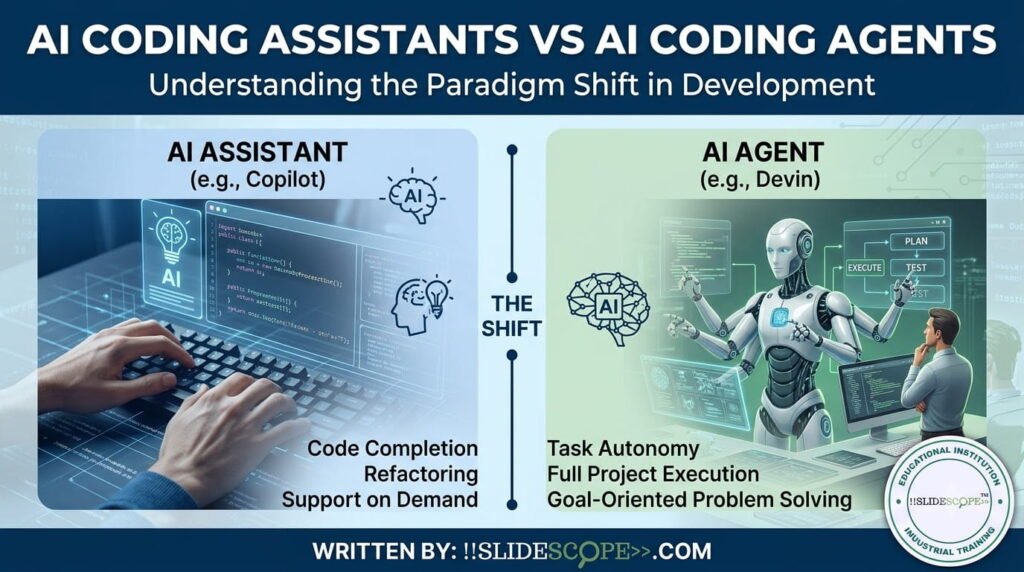
An AI Coding Assistant works like having a knowledgeable colleague sitting next to you. It’s reactive by nature—it waits for your input. You write code, ask a question, or request a suggestion, and it responds. The assistant analyzes the immediate context: the file you’re working on, nearby code structures, and your explicit prompt.
The workflow is straightforward and familiar:
- You type or highlight code
- The assistant provides inline completions or suggestions
- You review and accept, modify, or reject the suggestion
- You remain in control, making all final decisions
How it works: The assistant operates within a limited scope. It might suggest how to complete a function you’re typing, explain why a particular syntax is causing an error, or help you refactor a single file. It sees what’s immediately visible and responds accordingly. The intelligence stops at the suggestion—execution and decision-making remain entirely human-driven.
Best use cases: Based on my experience building multiple client applications at Slidescope, I’ve found AI coding assistants excel at:
- Writing boilerplate code that follows established patterns
- Filling in repetitive function scaffolding
- Explaining syntax errors and providing quick fixes
- Doing localized refactors within a single file or function
- Generating code comments and documentation
- Suggesting variable names and method implementations
Traditional tools like GitHub Copilot and JetBrains AI Assistant operate in this mode. When I’m building features for our applications, these tools are perfect for the moments when I need quick suggestions without context-switching.
What is an AI Coding Agent?
An AI Coding Agent represents a fundamentally different approach. Rather than waiting for you to tell it what to do line-by-line, an agent takes a high-level goal and runs with it. You describe what needs to happen—whether it’s a GitHub issue, a feature description, or a bug report—and the agent breaks it down, navigates your codebase independently, and iterates toward a solution.
This is where the paradigm shift happens. When I handed the task of creating a comprehensive HR & Payroll Management ERP to my team, they worked collaboratively with complex requirements. An AI coding agent operates similarly—it can handle such complexity autonomously.
How it works: A coding agent is proactive. It:
- Parses your high-level objective
- Explores your file system and understands your project structure
- Runs shell commands to understand the current state
- Writes code, runs tests, and observes failures
- Iterates and adapts based on test results and compilation errors
- Opens pull requests or makes commits when appropriate
- Continues working until the goal is achieved
The agent operates across repository-wide scope, managing dependencies, imports, and architectural considerations automatically.
Best use cases: Agents shine when you need:
- Large multi-file refactors across your entire codebase
- Implementation of self-contained features from start to finish
- Complex bug fixes that require understanding multiple files and their interactions
- Test-driven generation where failures guide the implementation
- Creating new modules or integrating external libraries
- Handling repetitive but complex tasks like adding logging, error handling, or security measures across multiple files
Tools like Aider, Cline, Claude Code, and the agentic modes in Cursor exemplify this category.
The Core Differences: A Practical Breakdown
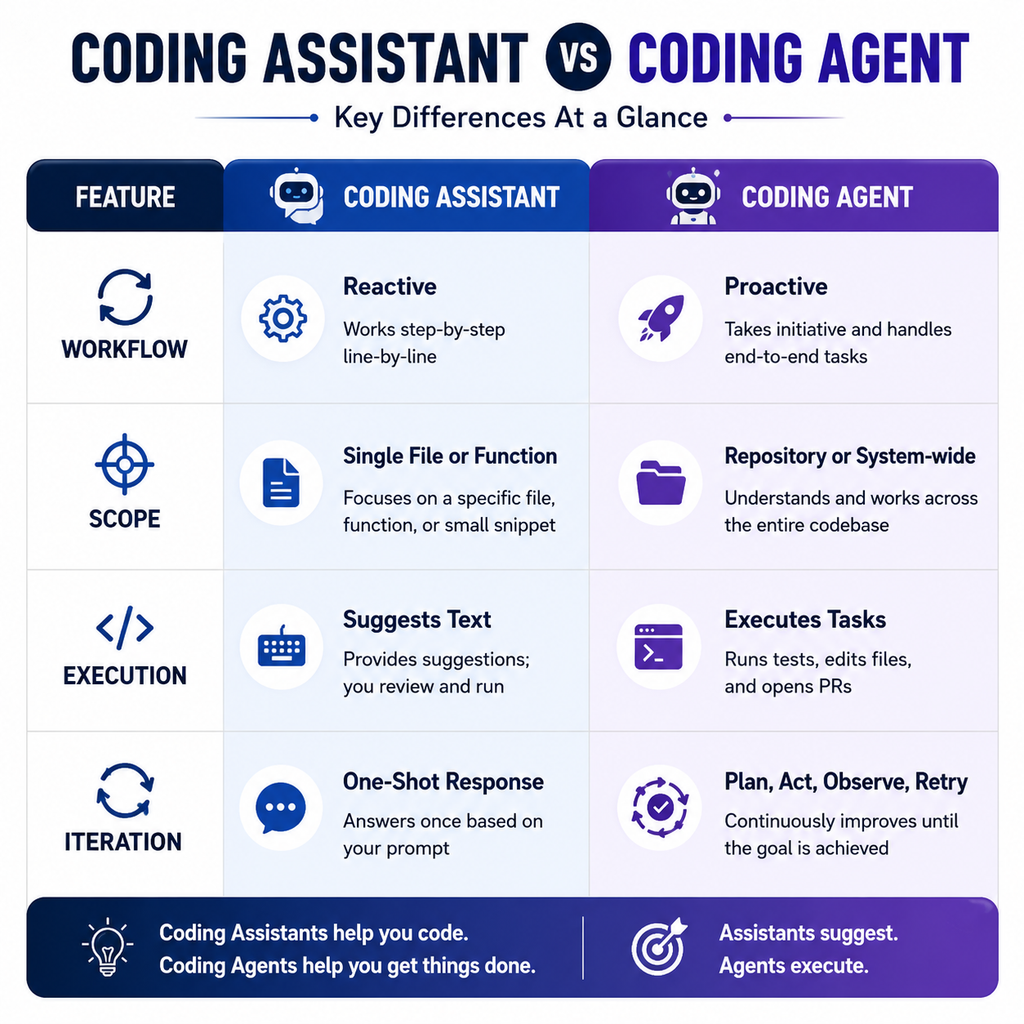
Let me illustrate these differences through the lens of actual project work:
Workflow Distinction: When I built the Banquet and Hotel Management ERP, certain features required reactive iteration—small improvements and bug fixes. These are assistant territory. But when we needed to refactor the entire payment processing module to support multiple currencies and payment gateways, that was agent work. An agent could navigate the codebase, update database schemas, modify API integrations, and rewrite relevant functions across the system—all coordinated toward one objective.
Scope Matters: A coding assistant works within a limited sphere. It’s ideal for the typical developer’s day: completing a function, reviewing syntax, suggesting a variable name. But when you’re implementing the Pathology Lab Management System—a complex system with test management, report generation, and multiple user roles—you need something that understands the entire system architecture. An agent grasps this broader scope.
Execution Model: The assistant suggests; you execute. The agent executes; you review. This distinction is critical. With an assistant, you’re always in the loop, making decisions, writing code. With an agent, you step back, describe the objective, and let it work. When it encounters a test failure, it figures out why and tries a different approach. When it hits a compilation error, it reads the error message and adapts.
Iteration Capability: An assistant gives you one shot—one suggestion per prompt. If it’s wrong, you fix it and ask again. An agent is designed for multi-step iteration. It understands the feedback loop. It can run your test suite, see what failed, adjust its approach, run tests again, and repeat until success.
Real-World Scenarios from My Development Journey
Scenario 1: Building a Feature (Coding Assistant Territory)
While developing applications for Slidescope’s platform, I frequently need to add new features to existing modules. When adding a new dashboard widget or extending an API endpoint, the workflow is:
- I open the relevant file
- I describe what I want: “Add a new validation function that checks email format and uniqueness”
- The assistant suggests the function implementation
- I review, modify if needed, and integrate it
- Done in minutes
This is perfect assistant work. The context is local, the task is well-defined, and human judgment on the exact implementation adds value.
Scenario 2: Refactoring a Complex System (Coding Agent Territory)
When we migrated the Kanity platform to improve performance and scalability, we needed to refactor the authentication system across multiple microservices. The scope included:
- Updating authentication middleware in 4 different services
- Modifying database migrations
- Updating API calls in 6 different client applications
- Adjusting configuration files
- Running and passing integration tests
This is agent territory. Describing the objective—”Migrate from JWT to OAuth2 across our microservices architecture”—and letting the agent handle the coordinated changes across files, with intelligent iteration through test failures, would have saved days of manual coordination.
The Workflow Implications
For Coding Assistants: The workflow remains fundamentally human-centered. You’re the driver; the assistant is the navigator. You make strategic decisions; it provides tactical suggestions. This works beautifully for the majority of daily programming tasks.
For Coding Agents: The workflow becomes collaborative in a different way. You’re the strategist; the agent is the implementer. You define objectives; it determines tactics. This works best for larger, more complex initiatives where human review of results is more important than human guidance of each step.
Choosing the Right Tool for the Job
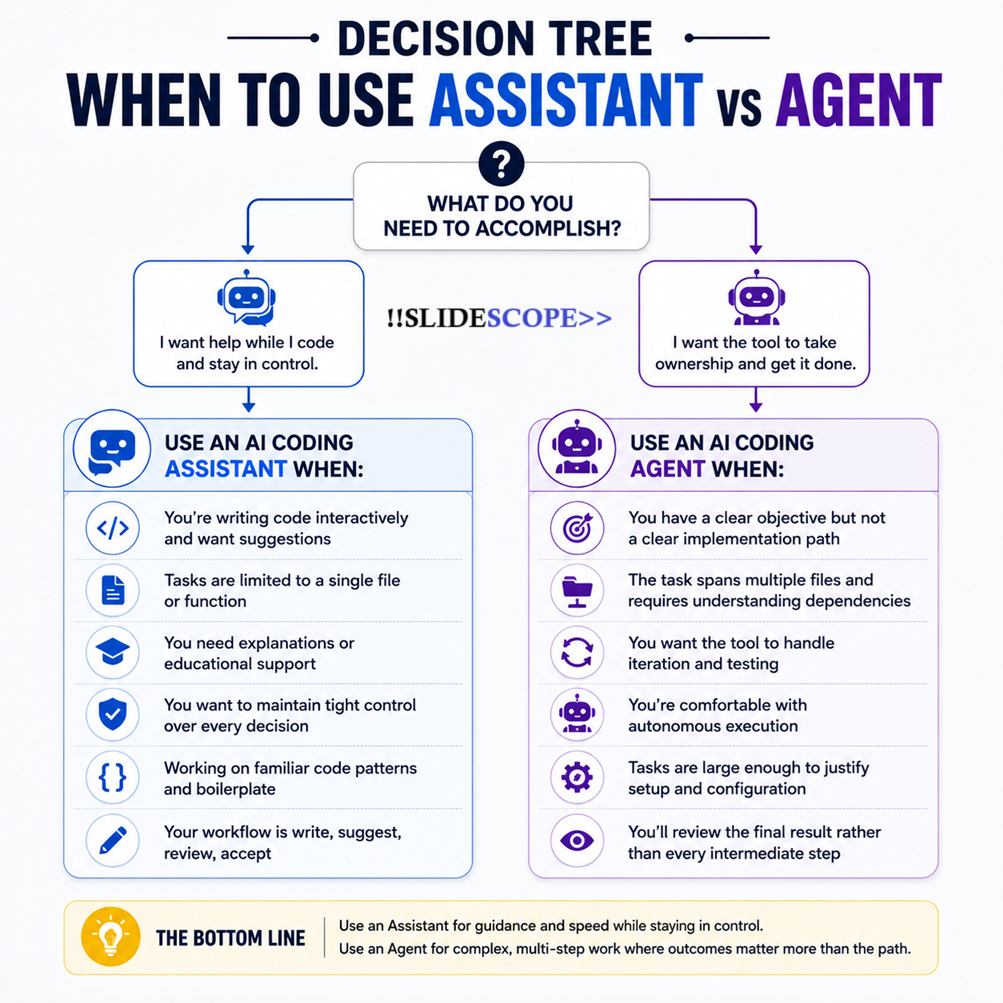
In my role training professionals through Slidescope’s courses and in my consulting work, I’ve seen the confusion this creates. Here’s my practical guidance:
Use an AI Coding Assistant when:
- You’re writing code interactively and want suggestions
- Tasks are limited to a single file or function
- You need explanations or educational support
- You want to maintain tight control over every decision
- Working on familiar code patterns and boilerplate
- Your workflow is write, suggest, review, accept
Use an AI Coding Agent when:
- You have a clear objective but not a clear implementation path
- The task spans multiple files and requires understanding dependencies
- You want the tool to handle iteration and testing
- You’re comfortable with autonomous execution
- Tasks are large enough to justify setup and configuration
- You’ll review the final result rather than every intermediate step
The Productivity Multiplier Effect
After building 300+ dashboards and implementing multiple complex ERPs, I’ve learned that productivity gains come from eliminating context-switching and decision fatigue. An assistant reduces the friction within a single file. An agent reduces the friction across an entire project.
When I’m mentoring students working on capstone projects—building multi-module applications with databases, APIs, and frontends—I see the difference clearly. Students using assistants get help writing individual functions faster. Students working with agents can complete entire features faster because the tool handles the orchestration.
The Future: Hybrid Workflows
The most effective developers I’ve encountered don’t choose one or the other—they use both. They use agents for major refactors and feature implementations, then use assistants for polish, documentation, and edge cases. They understand that different problems have different optimal tools.
In my work with Slidescope’s curriculum development and my consulting practice, I predict we’ll see increasingly sophisticated agents while assistants become more specialized. Assistants might focus on educational support or specific languages. Agents will handle larger orchestration challenges.
[[SCREENSHOT PLACEHOLDER: Example – Agent Handling Multi-File Task with Human Review Point]]
Practical Integration
If you’re building applications or working on development teams, start experimenting with both categories. Use a coding assistant like GitHub Copilot or JetBrains AI for your daily work—get comfortable with inline suggestions and quick iterations. Then, for your next significant refactor or feature, try an agent-based tool like Claude Code or Aider.
Document what works for your workflow. You’ll likely discover that your most efficient development days involve both: agents handling the heavy lifting on complex problems, assistants providing quick support on tactical tasks.
Conclusion
The distinction between AI coding assistants and AI coding agents isn’t merely technical—it represents a shift in how we think about developer productivity. Assistants augment human decision-making. Agents amplify human capability by handling execution and iteration autonomously.
Based on my experience building enterprise systems, training thousands of developers, and working on projects ranging from simple web applications to complex ERPs, I can confidently say: both have a place in modern development. Understanding which tool fits which problem is the key to making the most of AI in your development practice.
The future of coding isn’t about choosing between human and machine intelligence—it’s about intelligently orchestrating both toward faster, better, more reliable software development.

Ankit Srivastava is an IT trainer, technology educator, and digital skills mentor with expertise in programming, data analytics, AI, and software development. He has successfully trained thousands of learners, with more than 10,000 student enrollments on Udemy. His practical teaching approach empowers students and professionals to build in-demand technical skills. Colorstech channel where Ankit posts video tutorials has more than 8000 Subscribers.