A few weeks after I published my article on the Do’s and Don’ts of vibe coding, I got a message from someone who’d read it and asked a fair question: “This all sounds good in theory, but would you actually trust vibe-coded software for something as data-sensitive as a school? Student records, fee collections, attendance — that’s not a side project, that’s real institutional trust.”
It’s a good question, and honestly, it’s the exact question I asked myself before we started building our School ERP platform. So instead of answering it in the abstract, I want to walk you through the real thing — what we actually built, how, what went into making it secure enough for schools to trust with student and financial data, and where the project stands today after a genuinely important development: a partnership with the IT team at Kanity Solutions (Ravi Tiwari and Amit Tyagi) that took it from a solid product to an enterprise-ready one.
I’m Ankit Srivastava, and this one’s part product story, part technical honesty session.
Why a School ERP, Specifically
School management software isn’t glamorous, but it’s a category I’ve had a soft spot for since early in my career. Schools — especially small and mid-sized private institutions across India and similar markets — are often stuck between two bad options: expensive, overbuilt enterprise ERPs designed for large university systems, or a patchwork of registers, WhatsApp groups, and spreadsheets that technically works until it very visibly doesn’t.
We wanted to build something in between — genuinely capable software, covering admissions, fee collection, attendance, transport, hostel management, staff records, and reporting, but built fast enough and priced sensibly enough that a school with a few hundred students could actually afford and adopt it.
That “built fast enough” part is where vibe coding came in.
Building It: What Actually Happened
We didn’t set out with a fixed plan to “vibe code a School ERP” as some kind of experiment. We set out to build a School ERP, and vibe coding — using AI coding assistants conversationally to generate and iterate on code — happened to be the most efficient way to move through the sheer number of modules a system like this needs.
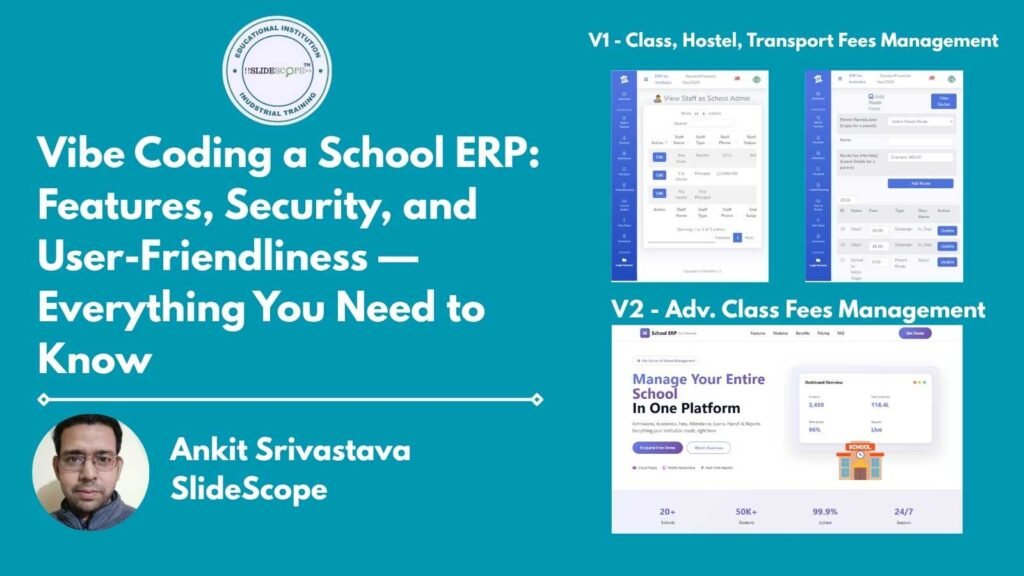
If you look at the dashboard screenshot below, from one of our interface versions, you’ll get a sense of the scope involved — Staff & Teachers, Students, Attendance, Transport, Hostel/Boarding, Class & Section, Fees Setup, Homework, and Login Screens, each with their own sub-components and workflows.
Show Image
That’s not a small surface area. Building a system with that many interconnected modules the traditional way — writing every form, every database schema, every validation rule by hand — is realistically months of work for a small team. We built the working core of it in a fraction of that time, using exactly the discipline I described in my earlier vibe coding article: clear specs for each module before writing a single prompt, building and testing one piece at a time (fee setup before fee collection, attendance capture before attendance reporting), and manually reviewing every line of code that touched student records or payment data.
I want to be direct about this, because I think it matters for trust: vibe coding didn’t lower our bar for what “done” meant. It changed how fast we could get to a working version we could then rigorously test — the testing, security review, and refinement still took real, deliberate time.
The Features, Walked Through Honestly
Rather than list features like a sales page, let me tell you what each module is actually solving, because that’s usually what a school administrator actually wants to know.
Student and staff management covers the basics you’d expect — full records, class assignments, contact details — but the part schools actually care about is how quickly a new admission or new staff member can be entered and immediately reflected across attendance, fees, and class rosters, without duplicate data entry in three different places.
Fees management is genuinely the module that makes or breaks a school ERP’s usefulness, because fee collection is where most schools bleed administrative time. Ours supports fee-head setup (tuition, transport, hostel, admission, and custom heads), class-wise and student-wise fee mapping, partial payments, dues tracking, and instant PDF receipt generation. For a lot of the small school administrators we’ve spoken with, “can I see who hasn’t paid this month, in under 30 seconds” is the single most important question the software needs to answer well.
Attendance tracking is straightforward on the surface — mark present/absent — but the value is in the reporting layer sitting on top of it, letting administrators and teachers pull attendance trends without manually tallying registers.
Transport and hostel/boarding management exist because, especially outside major cities, a meaningful share of students depend on school transport or boarding, and those come with their own fee structures and record-keeping needs that generic software often ignores entirely or bolts on as an afterthought.
Homework and class/section management round out the day-to-day academic administration side, giving teachers a digital way to assign and track homework without a separate tool entirely.
Two Versions, Two Different Needs
We’ve actually built and shipped this as two distinct versions, because we learned fairly quickly that not every school needs the same level of complexity.
Version 1 is the fuller-featured build — class fees, hostel fees, and transport fees all handled natively, alongside the full set of academic and administrative modules. This is the version for schools that genuinely run transport routes and boarding facilities and need those costs and records managed inside the same system as tuition. You can explore how developers can review this version here: School Management System V1.
Version 2 deliberately strips this down to a cleaner, SaaS-first product focused on class fees only, with a simpler per-student subscription pricing model (Starter, Professional, and Enterprise tiers), built for schools that don’t need hostel or transport modules and want something lighter to onboard onto. You can review this version here: School ERP SaaS V2.
I think this two-version approach is worth mentioning specifically because it reflects something I genuinely believe about software for institutions like schools: more features isn’t automatically better. A school with no hostel or transport program shouldn’t have to navigate modules they’ll never use just because a “complete” ERP included them by default.
Security — Where I Refuse to Cut Corners
Here’s where I want to be the most careful in this article, because this is exactly the concern the reader who messaged me raised, and it’s the right concern to have.
Student data and fee/payment data are sensitive by definition — names, contact details, academic records, and financial transactions. Vibe coding a feature quickly does not, and should not, mean skipping the security review that any software handling this kind of data needs. Every part of our system dealing with authentication, role-based access, and payment or fee data went through manual code review, not just automated testing — this was a non-negotiable rule throughout development, exactly as I described in my Do’s and Don’ts article.
Practically, this means role-based access control, so a teacher’s login can’t see financial reports meant for administrators, and a front-office staff account handling fee collection doesn’t have access to modify academic records. It means data is encrypted in transit, with proper session handling rather than shortcuts that “happened to work” in testing. And it means we treat every fee collection and payment-related code path as high-stakes by default, reviewed more carefully than a cosmetic UI feature would be.
I’d also say this plainly: security isn’t a one-time checkbox you tick before launch. It’s an ongoing discipline, especially as more schools onboard and the system handles a growing volume of real financial transactions and student records.
User-Friendliness: Built for People Who Don’t Want to Learn Software
One consistent piece of feedback from school administrators — many of whom are not particularly tech-comfortable, and don’t want to be — is that they don’t want to “learn a system.” They want to do the task they already understand (collect a fee, mark attendance, add a student) without a steep learning curve.
This is where we spent a genuinely disproportionate amount of design attention, honestly more than on some of the flashier features. Clear step-by-step onboarding instructions (add staff, add class, register students, set up fee heads, map fees, collect payments, print receipts) walk a new administrator through the exact order operations need to happen in, because we learned early that presenting all the modules at once without that sequence created real confusion. The dashboard summary cards you can see in the screenshot above — reports generated, institutions onboarded, student counts, active sessions — exist specifically so an administrator gets a sense of system health at a glance, without digging into individual modules.
The Kanity Solutions Partnership: Taking It Enterprise-Grade
The most significant recent development in this project has been partnering with the IT team at Kanity Solutions. Where our earlier versions were strong, functional products built rapidly and iteratively, this partnership has been specifically focused on hardening the platform into something enterprise-ready — the kind of infrastructure, scalability, and operational maturity that larger school groups and multi-branch institutions need before they’ll commit to a platform long-term.
This has meant deeper investment in infrastructure reliability, more rigorous testing processes layered on top of what we’d already built, and the kind of operational polish — dedicated support structures, uptime commitments, structured onboarding — that turns a genuinely good product into one large institutions feel confident standing behind their operations on.
If you’re a school administrator evaluating this for your institution, this is the version worth looking at now — the product has moved meaningfully beyond where it started.
What This Whole Project Taught Me About Vibe Coding for Real Products
Coming back to where I started — would I trust vibe-coded software for something as sensitive as school data? My honest answer, having actually built this, is: yes, when the process around the AI-assisted development is treated with the same seriousness as any other software project. Vibe coding changed our speed, not our standards. The specs, the module-by-module testing, the manual security review, the ongoing hardening work with an experienced IT partner — none of that changed because AI wrote a lot of the initial code. If anything, having AI handle more of the repetitive implementation work freed up more of our time to focus on exactly those things.
If you’re a developer curious about how a project like this actually comes together — from the vibe-coded first versions through to an enterprise-hardened product — I’d genuinely encourage you to explore both versions linked above and see the evolution for yourself. And if this kind of practical, real-project approach to learning development is something you’re interested in, this is exactly the kind of hands-on work we walk through in our training programs at SlideScope.com.

Ankit Srivastava is an IT trainer, technology educator, and digital skills mentor with expertise in programming, data analytics, AI, and software development. He has successfully trained thousands of learners, with more than 10,000 student enrollments on Udemy. His practical teaching approach empowers students and professionals to build in-demand technical skills. Colorstech channel where Ankit posts video tutorials has more than 8000 Subscribers.